Showing posts with label Linux. Show all posts

Friday, July 8, 2011

5 Rocking Ubuntu-Based Linux Distributions


1.Linux Mint

Linux Mint is an Ubuntu-based distribution whose goal is to provide a more complete out-of-the-box experience by including browser plugins, media codecs, support for DVD playback, Java and other components. It also adds a custom desktop and menus, several unique configuration tools, and a web-based package installation interface. Linux Mint is compatible with Ubuntu software repositories.

 Desktop: Fluxbox, GNOME, KDE, LXDE, Xfce

 Home Page: linuxmint.com


2.Ultimate Edition


Ultimate Edition, first released in December 2006, is a fork of Ubuntu. The goal of the project is to create a complete, seamlessly integrated, visually stimulating, and easy-to-install operating system. Single-button upgrade is one of several special characteristics of this distribution. Other main features include custom desktop and theme with 3D effects, support for a wide range of networking options, including WiFi and Bluetooth, and integration of many extra applications and package repositories.

Desktop: GNOME, KDE, LXDE, Openbox, Xfce

 Home Page: ultimateedition.info


3.Trisquel GNU/Linux


Trisquel GNU/Linux is a 100% libre Ubuntu-based Linux distribution. Its main purpose is to provide an operating system for varied audience, including home and office users, educational institutions, multimedia workstations, etc. The project is managed by independent developers and is partially funded by donations.

 Desktop: GNOME, LXDE, Openbox 

Home Page trisquel.info


4.Lubuntu


Lubuntu is a fast, lightweight and energy-saving variant of Ubuntu using the LXDE (Lightweight X11 Desktop Environment) desktop. It is intended to have low-resource system requirements and is designed primarily for netbooks, mobile devices and older PCs.

Desktop: LXDE, Openbox

 Home Page: lubuntu.net


5.Bodhi Linux


Bodhi Linux is an Ubuntu-based distribution for the desktop featuring the elegant and lightweight Enlightenment window manager. The project, which integrates and pre-configures the very latest builds of Enlightenment directly from the project's development repository, offers modularity, high level of customisation, and choice of themes. The default Bodhi system is light -- the only pre-installed applications are Midori, LXTerminal, PCManFM, Leafpad and Synaptic but more software is available via Bodhi Software Center, a web-based software installation tool.

Desktop: Enlightenment

Home Page: bodhilinux.com

 Enjoy....................... ;-)

Tuesday, June 14, 2011

How to Make Ubuntu Look Like Windows 7


Ubuntu has pretty good theming system, visual effects, and eye-candy stuff, but you may love the elegance of Windows 7 Aero glass, transparency, or the Start Menu. Today I’ll show you how to transform Ubuntu to look like Windows 7.

Of course, it won’t be an exact match, but it’s close enough that at first glance a lot of people would think it’s Windows 7. Keep reading to see how to do this.

Installing the Win7 Theme

Let’s start by entering some commands—just open up a terminal window and enter this:

"cd ~/

sudo wget http://web.lib.sun.ac.za/ubuntu/files/help/theme/gnome/win7-setup.sh

sudo chmod 0755 ~/win7-setup.sh

~/win7-setup.sh"

This will download a script file that will be used later to tell your computer what files to download to complete the Win7 theme packages install. Once finished, a window will tell you that the installation will start now so just press OK.

Another window will pop up asking if you want to continue, answer yes for that window too. Now the terminal will begin downloading and installing the theme. It may take some time depending on your Internet speed. After that, a window will appear

Press OK, then back in the terminal enter:

"setup-win7-theme"

This command will setup Win7 theme and your computer will start transforming into windows style immediately. Wait for a few seconds and you will see a window asking you to logout so logout and log in again and this is what you will see:

Now your Ubuntu looks almost exactly like Windows. Congratulations! Now you have WinBuntu! You can even right-click the start button and choose “properties” to customize the start menu.

Uninstalling the Win7 Theme

During the setup of Win7 theme script, a backup of the previous Gnome settings got saved in your home folder, so if you ever get bored of this theme, you can uninstall it and rollback to previous Gnome state. The only downside though, is that there is no automatic uninstallation.

It’s not hard to do the uninstallation. Open your home folder there should be a file named “win7-uninstall.tar.gz”, open it with your archive manager and you’ll find your home folder, double-click it and you’ll see your username, double-click it too. There should be a “.gconf” file, extract that file to your home folder.

Forcefully uninstalling

In some cases when you try uninstalling the theme it won’t uninstall completely, leaving some Windows 7 icons or desktop wallpaper. In cases like this, you’ll have to remove the theme by deleting it’s files manually but don’t worry, it is easier than you think. Just open up a terminal window and type the following command followed by the enter key.

"rm -rf .gnome .gnome2 .gconf .gconfd .metacity"

NOTE: This will restore your gnome appearance setting back to the default like when you first installed Ubuntu.

Tuesday, June 7, 2011

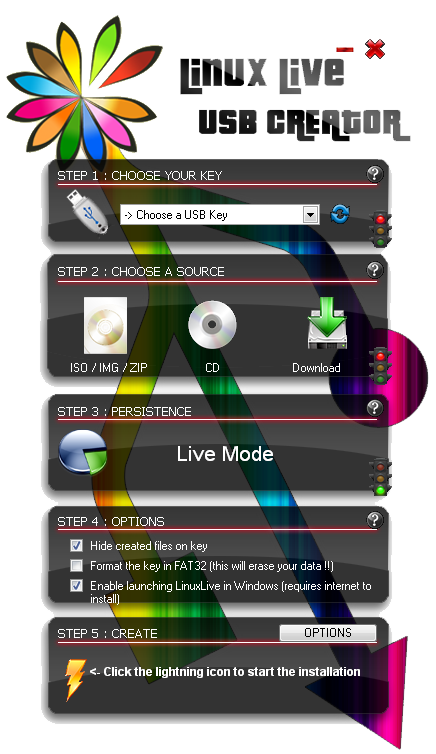
LinuxLive USB Creator (LiLi) :An easy way to create Live USB for any Linux Distro


Linux Live USB Creator (LiLi) is a Boot CD product from linuxliveusb.com, get 5 Stars Rating in many reviews , Linux Live USB Creator is a free program for Windows that allows you to create a bootable Live USB key with a Linux on it.

This program also offers an exclusive option of automatic virtualization to directly run Linux in Windows without any configuration nor installation.
1. create bootable Live USB of Ubuntu, Fedora, Debian, Damn Small Linux, Puppy Linux and many others !
2. enable persistency of your data
3. launch Linux directly in Windows with a special Portable VirtualBox
4. hide created files on the key

Anybody can use Linux Live USB Creator. It's really easy-to-use and you don't have to be a computer geek !

Creating a LinuxLive key is a five easy steps process :
step 1 : launch the LiLi USB Creator and choose a USB key or drive in the list
step 2 : select a ISO file or CD
step 3 : choose the size of persistency data (usually more than 250MB)
step 4 : check the options you want
step 5 : click the lightning button to start the creation

Your Live USB is ready to Boot Now Enjoy...


Features

Free and Open-source

LiLi is a completely free and open-source software for Windows only. It has been built with simplicity in mind and it can be used by anybody. All you have to do is to pick up a Linux in the list and give it a try.


Supported Linux Distros

No reboot needed
Are you sick of having to reboot your PC to try Linux ? No need with LiLi. It has a built-in virtualization feature that lets you run your Linux in Windows just out of the box !

Supports many Linux distributions
Wow ! Did you see that never-ending list ? They are almost all there : Ubuntu, Fedora, Debian, OpenSUSE, Mint, Slax, CentOS, ArchLinux, Gentoo, PCLinuxOS, Sabayon, BackTrack, Puppy Linux ...

Supported Linux Distros

Persistence
Having a Live USB is better than just using a Live CD because you can even save your datas and install softwares. This feature is called persistence (available only on selected Linux).

SmartClean & SmartDownload

SmartClean uninstalls properly any previous Live USB installs and SmartDownload lets you download any supported Linux in 2 clicks automatically selecting the best mirror to download it. SmartClean also lets you clean your USB key in one click.

And a lot more !

* Intelligent processing : LiLi works with many Linux, even if they are not officially supported
* Hidden install : LiLi hides the Linux install, your key stays clean
* File integrity : tells you if your ISO is corrupted
* Keeps your data on your USB device (format only if needed)
* Intelligent format : can format disks bigger than 32 GB
* Auto-Update : automatic updates when new Linux distributions are available
* Also works with .IMG files (experimental)

Download LinuxLive USB Creator (LiLi)

Wednesday, June 1, 2011

Top 10 Free Games For Ubuntu


1. Nexuiz

Nexuiz was originally developed by Lee Vermeulen and Forest ‘LordHavoc’ Hale, who started Alientrap Software in the summer of 2002. The goal of the project was to create a high quality first person shooter that could be played freely across all platforms in one package: PC, Mac, and Linux. The engine that powered Nexuiz was Forest Hale’s Darkplaces engine.

The first version of the game was released in 2005. Development continued with many online contributors over the years, with version 2.5 released in October of 2009. Since its release it has been downloaded over 5 million times, and is included with many Linux distributions.

In mid-2010 it was announced that a new XBLA, PSN, and Steam downloadable remake of Nexuiz would be done from the ground up by IllFonic using Crytek’s highly anticipated CryENGINE3 game engine. Original Nexuiz designer Forest ‘LordHavoc’ Hale is now working with Illfonic on the new version, and Lee Vermeulen moved towards Capsized development.

Several notable features of the game include

* ability to multiplay up to 64 players
* ability to generate bots for practice sessions
* dynamic lighting system similar to Doom 3

Home

2.VDrift

Want realistic racing? Then you need to try VDrift. First released in 2005 by Joe Venzon and inspired by Gran Turismo, Venzon created a simple racing game powered by the Vamos Automotive Simulator. Two years, three programmers, and a ton of code later, it's got extremely realistic physics, 28 cars, 19 tracks, AI players, networking, and great looking graphics.

VDrift is a driving simulation game, made with drift racing in mind. The driving physics engine was recently re-written from scratch but was inspired and owes much to the Vamos physics engine. It is released under the GNU General Public License (GPL) v2. It is currently available for Linux, FreeBSD, Mac OS X and Windows.

This game is in the early stages of development but is already very playable. Currently the game features:

* Over 40 tracks based on famous real-world tracks
* Almost 40 cars based on real-world vehicles
* Very realistic, simulation-grade driving physics
* Mouse/joystick/gamepad/wheel/keyboard support
* Fully modeled tracks, scenery and terrain
* Several different camera modes
* Basic replay system with Skip Forward/Skip Backward
* Fully customizable controls
* Joystick, mouse and keyboard input filtering
* Brake and reverse lights
* Driver aids: automatic shifting, traction control, anti-lock braking
* Experimental force feedback
* Race against up to 3 AI with variable difficultly
* Engine and road sounds
Home

3.Tremulous

Tremulous is a free, open source game that blends a team based FPS with elements of an RTS. Players can choose from 2 unique races, aliens and humans. Players on both teams are able to build working structures in-game like an RTS. These structures provide many functions, the most important being spawning. The designated builders must ensure there are spawn structures or other players will not be able to rejoin the game after death. Other structures provide automated base defense (to some degree), healing functions and much more…

Player advancement is different depending on which team you are on. As a human, players are rewarded with credits for each alien kill. These credits may be used to purchase new weapons and upgrades from the “Armoury”. The alien team advances quite differently. Upon killing a human foe, the alien is able to evolve into a new class. The more kills gained the more powerful the classes available.

The overall objective behind Tremulous is to eliminate the opposing team. This is achieved by not only killing the opposing players but also removing their ability to respawn by destroying their spawn structures.

Home

4.Alien Arena

Alien Arena is a completely free FPS started by COR Entertainment in 2004 comprising of a science fiction ambience and a Quake like gameplay. This game is playable in single player mode against bots, but the action and thrill lies at the online multiplayer mode. Features of the Alien Arena 2007 include an internal server browser for finding other people to play online and an external program that acts as an IRC interface. There are 6 game types and 6 game mutators that changes the gameplay. Cattle Prod is a new game type that requires you to herd robotic cattle to earn points. Alien Arena 2007 is playable in Windows, Linux and FreeBSD.

Home

5.TORCS

If you want a powerful racing game, look no further than TORCS, The Open Racing Car Simulator. It's gone from a 1997 2D soapbox derby simulator to a powerful 3D racing game with championships, tons of tracks, a thriving community, and all the third party tracks and cars you can download. There are even two online championships: TORCS Driving Championship and
The TORCS Racing Board.

Home

6.Trigger

If arcade-style racing is your style, give Trigger a try. It's simple: they give you a car, and you have to navigate a tricky path full of off-road terrain with an extremely tippy car.
Go too fast, and you risk flipping off of the road. But move too slowly, and you risk being dominated by your cunning AI opponents.

To install, just use your favorite package manager to grab the 'trigger' package in
the universe repository.

Home

7.America’s Army


America’s Army is a tactical, multiplayer, FPS (first person shooter) owned by the United States Government and released as a global public relations initiative to help with U.S. Army recruitment. The first version, Recon, was released on 4th July 2002. The current version 2.8.2 was released on september 2007. Latest Linux available version is 2.5

It’s the first well known computer game used for political aims. The game is used as a playable recruiting tool and critics have charged the game serves as a propaganda device. A counter on the homepage of the PC version shows over eight million registered accounts as of 2007. GameSpy tracked the game usage and reported an average of 4,500 players at any one time between 2002 and 2005.

Home

8.TrueCombat: Elite


TC:Elite happens to be a total-conversion modification of Wolfenstein: Enemy Territory by Team Terminator and Groove Six Studios. The game is free and playable across all platforms. Notable features include iron sights aiming (no crosshair), multi layer object penetration, letterbox / wide screen view modes, lag compensation, client side bullet prediction and support for PunkBuster, the anti cheat software.


Home


9.Scorched 3D

Scorched 3D is a 100% free turn-based artillery game modeled after the classic DOS game Scorched Earth ‘The Mother Of All Games’. Operatable across all operating systems. What started as a 3D landscape generator has now become a cool 3D game that requires skills to master. Players are supposed to take turns homing in to hit the target by adjusting the angle, rotation, power and a weapon of choice every other turn. Hits and kills will generate income for you to buy better weapons and items. Note that items are as important as weapons.

Home


10.Savage 2

Savage 2 is a fast-paced, unique First Person Shooter slash Real Time Strategy. While the game is primarily a First Person Shooter, it incorporates elements of strategy into the game, making it more akin to Tremulous or Wolfenstein than, say, OpenArena.

Apart from choosing a faction, you can also select from one of the several combat units, including pure fighters, spell casters, builders, or even an artillery team. Each has a unique role, different from the rest. It is important to understand the strengths and weaknesses of each character and use them accordingly, helping your team win. For example, as an engineer, you will avoid direct combat and focus on repairing defensive structure. As a magician, you will heal your teammates and cast spells from afar. Choosing the right strategy is the key to playing well.

Home

Please Post Your Favorite Games too... All The Best

Friday, April 30, 2010

Puppy Linux Small But Powerful


Test Machine Specs:
Board: Asus A7V400MX
Processor: 2 GHz AMD Athlon XP
Hard Drive: Segate 80GB ATA
Memory: 256MB DDRSD RAM
Display: S3G UniChrome IGP

Intro:
Puppy Linux was born in Australia, and was created by Barry Kauler. It is one of the few mini-distros that has earned respect from Linux users and developers around the world. As a testimony to its popularity, it is presently ranked number 8 in Distrowatch.


Installation/Setup:
In this case i used Puppy linux 4.31,You can download Puppy Linux 4.31 directly from here (http://distro.ibiblio.org/pub/linux/distributions/puppylinux/puppy-4.3.1/pup-431.iso) OR (http://ftp.nluug.nl/ftp/pub/os/Linux/distr/puppylinux/puppy-4.3.1/pup-431.iso). After created a Live USB with the Help of LinuxLive USB Creator (LiLi) pluged into USB port and booted in the normal way. It was then asked for my keyboard layout and the type of X server that I will be using, of which I just selected the default or the highlighted configuration. I also had an option to set my screen resolution, and to be safe I just used 1024x768 for my monitor. The boot/start-up was smooth sailing and my hardware were well-detected including my audio, video, floppy, and Ethernet.


Look and Feel:
The very light-weight JWM is the default window manager for Puppy Linux and ROX for handling files. I find the desktop very responsive as most applications were quick to open. The icons were well- arranged for easy access to important programs. Even aLinux newbie can easily navigate the very simple desktop. There were also few available wallpapers if you want to change the look a bit.


Package Management:
Puppy Linux has plenty of valuable pre-installed software applications like Abiword, Inkscape, Python, Perl, Inkscape, Gxine, Seamonkey, and a lot more. It also has several network administration tools and a few games. An easy-to-use graphical software manager called PET takes care of installing and uninstalling packages. It can also fetch packages from its own repo and from unofficial packages (DotPups) that were made by its community members. Packages from the Slackware repository is also available for download, but you have to convert the packages first in CLI using a utility called “tgz2pet” for it to be used.

Gxine:
It is the puppy default media player play any kind of media including 3gp,mkv,avi,mp4 and so on. NB: Now Puppy Uses Gnome Player still all codecs are preloaded..

Stability:
Though I can’t really judge Puppy’s stability based only from the short period that I have used it, there’s no doubt that it is a tough and tested distro. As a Slackware-based system, I can consider it generally stable with expected minor bugs here and there.


Conclusion:
I would say that Puppy Linux can be a computer user’s best friend with its life-saving ability to rescue a broken system.It is easy to hack a windows drive and recovering data.It is also helpful to provide protection to windows against USB virus attack (If you sure there is virus in the USB drive then just plug USB drive on puppy and copy the needed data to hard drive then initialize the USB drive ,it realy works) I also find it very easy to use, thus, I can recommend it to beginners and Windows users who wanted to try Linux the trouble-free way.

And You can Download The Latest Version From Here:www.puppylinux.org
Enjoy...

Friday, April 16, 2010

AIRCEL POCKET INTERNET Review


HI
I AM A AIRCEL POCKET INTERNET
USER
NOW I AM USING AIRCEL GPRS
WITH WINDOWS AND ALSO WITH MY LINUX Ubuntu 9.10 WITH OUT
ANY PROBLEM .IT'S SPEED RANGES 56KB TO 420 KB I GOT DOWNLOADING SPEED 10KB TO 40 KB FROM MOST OF WEBSITES
USING WITH Mozilla Firefox 3.5 AND WITH
FREE DOWNLOAD
MANAGER. AIRCEL GPRS
ALSO WORK WELL WITH Ubuntu 9.10
IN Ubuntu 9.10 IT IS
EASY TO CONFIGURE A MOBILE BROADBAND CONNECTION
JUST PLUG IN YOUR MOBILE DEVICE Ubuntu 9.10 WILL
FIND IT AND A POP UP WINDOW WILL START JUST SELECT YOUR OPTIONS OR
ENTER IT MANUALLY THEN CONNECT USING THE NETWORK TAB IN THE UPPER
PANAL(RIGHT SIDE)
OR YOU MAY CONFIGURE CONNECTION MANUALLY FROM NETWORK CONNECTIONS

More Info contact me:8907234140