Showing posts with label puppy. Show all posts

Tuesday, June 7, 2011

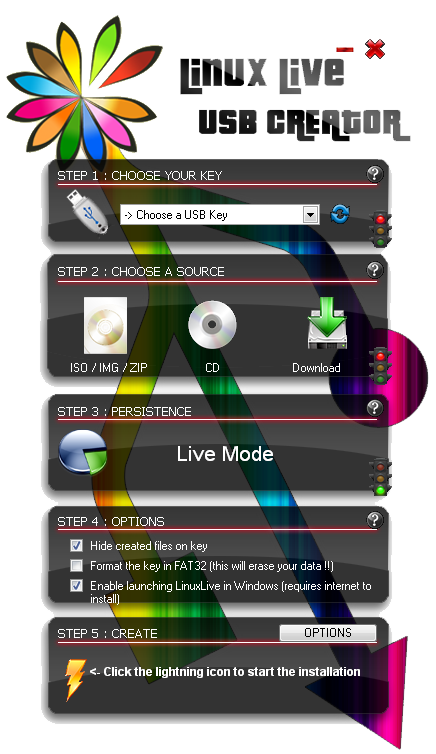
LinuxLive USB Creator (LiLi) :An easy way to create Live USB for any Linux Distro


Linux Live USB Creator (LiLi) is a Boot CD product from linuxliveusb.com, get 5 Stars Rating in many reviews , Linux Live USB Creator is a free program for Windows that allows you to create a bootable Live USB key with a Linux on it.

This program also offers an exclusive option of automatic virtualization to directly run Linux in Windows without any configuration nor installation.
1. create bootable Live USB of Ubuntu, Fedora, Debian, Damn Small Linux, Puppy Linux and many others !
2. enable persistency of your data
3. launch Linux directly in Windows with a special Portable VirtualBox
4. hide created files on the key

Anybody can use Linux Live USB Creator. It's really easy-to-use and you don't have to be a computer geek !

Creating a LinuxLive key is a five easy steps process :
step 1 : launch the LiLi USB Creator and choose a USB key or drive in the list
step 2 : select a ISO file or CD
step 3 : choose the size of persistency data (usually more than 250MB)
step 4 : check the options you want
step 5 : click the lightning button to start the creation

Your Live USB is ready to Boot Now Enjoy...


Features

Free and Open-source

LiLi is a completely free and open-source software for Windows only. It has been built with simplicity in mind and it can be used by anybody. All you have to do is to pick up a Linux in the list and give it a try.


Supported Linux Distros

No reboot needed
Are you sick of having to reboot your PC to try Linux ? No need with LiLi. It has a built-in virtualization feature that lets you run your Linux in Windows just out of the box !

Supports many Linux distributions
Wow ! Did you see that never-ending list ? They are almost all there : Ubuntu, Fedora, Debian, OpenSUSE, Mint, Slax, CentOS, ArchLinux, Gentoo, PCLinuxOS, Sabayon, BackTrack, Puppy Linux ...

Supported Linux Distros

Persistence
Having a Live USB is better than just using a Live CD because you can even save your datas and install softwares. This feature is called persistence (available only on selected Linux).

SmartClean & SmartDownload

SmartClean uninstalls properly any previous Live USB installs and SmartDownload lets you download any supported Linux in 2 clicks automatically selecting the best mirror to download it. SmartClean also lets you clean your USB key in one click.

And a lot more !

* Intelligent processing : LiLi works with many Linux, even if they are not officially supported
* Hidden install : LiLi hides the Linux install, your key stays clean
* File integrity : tells you if your ISO is corrupted
* Keeps your data on your USB device (format only if needed)
* Intelligent format : can format disks bigger than 32 GB
* Auto-Update : automatic updates when new Linux distributions are available
* Also works with .IMG files (experimental)

Download LinuxLive USB Creator (LiLi)

Friday, April 30, 2010

Puppy Linux Small But Powerful


Test Machine Specs:
Board: Asus A7V400MX
Processor: 2 GHz AMD Athlon XP
Hard Drive: Segate 80GB ATA
Memory: 256MB DDRSD RAM
Display: S3G UniChrome IGP

Intro:
Puppy Linux was born in Australia, and was created by Barry Kauler. It is one of the few mini-distros that has earned respect from Linux users and developers around the world. As a testimony to its popularity, it is presently ranked number 8 in Distrowatch.


Installation/Setup:
In this case i used Puppy linux 4.31,You can download Puppy Linux 4.31 directly from here (http://distro.ibiblio.org/pub/linux/distributions/puppylinux/puppy-4.3.1/pup-431.iso) OR (http://ftp.nluug.nl/ftp/pub/os/Linux/distr/puppylinux/puppy-4.3.1/pup-431.iso). After created a Live USB with the Help of LinuxLive USB Creator (LiLi) pluged into USB port and booted in the normal way. It was then asked for my keyboard layout and the type of X server that I will be using, of which I just selected the default or the highlighted configuration. I also had an option to set my screen resolution, and to be safe I just used 1024x768 for my monitor. The boot/start-up was smooth sailing and my hardware were well-detected including my audio, video, floppy, and Ethernet.


Look and Feel:
The very light-weight JWM is the default window manager for Puppy Linux and ROX for handling files. I find the desktop very responsive as most applications were quick to open. The icons were well- arranged for easy access to important programs. Even aLinux newbie can easily navigate the very simple desktop. There were also few available wallpapers if you want to change the look a bit.


Package Management:
Puppy Linux has plenty of valuable pre-installed software applications like Abiword, Inkscape, Python, Perl, Inkscape, Gxine, Seamonkey, and a lot more. It also has several network administration tools and a few games. An easy-to-use graphical software manager called PET takes care of installing and uninstalling packages. It can also fetch packages from its own repo and from unofficial packages (DotPups) that were made by its community members. Packages from the Slackware repository is also available for download, but you have to convert the packages first in CLI using a utility called “tgz2pet” for it to be used.

Gxine:
It is the puppy default media player play any kind of media including 3gp,mkv,avi,mp4 and so on. NB: Now Puppy Uses Gnome Player still all codecs are preloaded..

Stability:
Though I can’t really judge Puppy’s stability based only from the short period that I have used it, there’s no doubt that it is a tough and tested distro. As a Slackware-based system, I can consider it generally stable with expected minor bugs here and there.


Conclusion:
I would say that Puppy Linux can be a computer user’s best friend with its life-saving ability to rescue a broken system.It is easy to hack a windows drive and recovering data.It is also helpful to provide protection to windows against USB virus attack (If you sure there is virus in the USB drive then just plug USB drive on puppy and copy the needed data to hard drive then initialize the USB drive ,it realy works) I also find it very easy to use, thus, I can recommend it to beginners and Windows users who wanted to try Linux the trouble-free way.

And You can Download The Latest Version From Here:www.puppylinux.org
Enjoy...